
Tools · Video
OpusClip pricing: free plan, credits and alternatives
Turns long videos into short clips for TikTok, Reels and Shorts automatically.
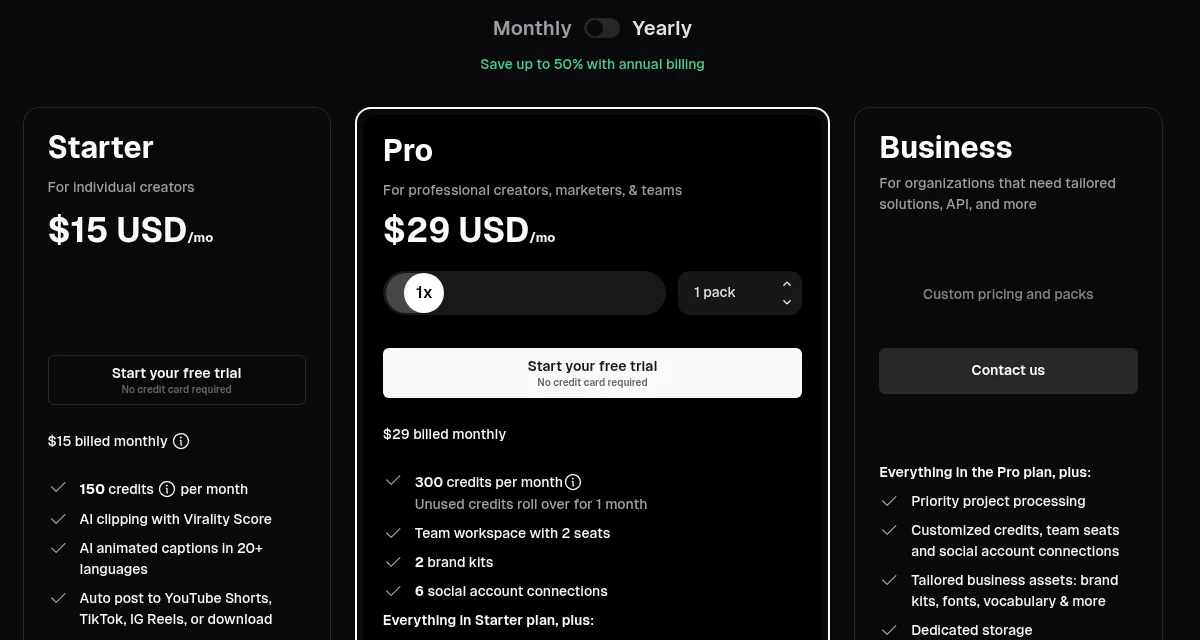
Quick answer: OpusClip has a free plan with 60 credits a month, Starter at US$15 a month (monthly only, 150 credits) and Pro at US$29 a month or US$14.50 a month billed yearly (300 credits), shown in US dollars on OpusClip's page. One credit is one minute of the video you upload. Only Pro gets a yearly discount.
All OpusClip pricing here was checked on 26 November 2026 on OpusClip's pricing page, opened from the UK, where it showed US dollars. We haven't converted anything. OpusClip showed no Black Friday offer on its pricing page when we checked; see our Black Friday 2026 AI tool deals for tools that have one.
Free plan
Key facts
Price
Free: US$0 (60 credits a month, with a watermark). Starter: US$15 a month, monthly only (150 credits a month). Pro: US$29 a month billed monthly, or US$14.50 a month billed yearly (US$174 a year, 3,600 credits over 12 months).
Free plan
Free forever, 60 credits a month; clips carry a watermark and can only be exported for 3 days.
Best for
Anyone filming talks, podcasts or how tos who wants short social clips.
Watch out for
Processing uses 1 credit per minute of the original video, so long uploads use credits quickly; you can pick just part of a video to process.
UK notes
OpusClip's public pricing page shows US dollars from the UK. One UK user reports euros on the in app upgrade screen (see below). Check the currency at checkout.
Made by
Opus · Visit site (affiliate link)
Affiliate link: if you sign up to OpusClip through our link, we may earn a commission at no extra cost to you. It doesn't change what we say about the tool or where it appears in our lists. How we make money.
Price checked on 2026-11-26 against the sources below. Prices change; always confirm on the provider's page. How we check prices.
Useful for
Alternatives to OpusClip
Descript
Edit video and audio by editing the transcript, with AI tools for clean-up and clips.
HeyGen
AI video maker with avatars and voice-overs for social posts and adverts.
OpusClip pricing, checked 26 November 2026
| Plan | Paying monthly | Billed yearly | Credits | Main limits |
|---|---|---|---|---|
| Free | US$0 | US$0 | 60 a month | Watermark, no editing, clips exportable for 3 days, up to 1080p |
| Starter | US$15 a month | No yearly price ("Starter plan only available in monthly") | 150 a month | Watermark removed, auto post to YouTube Shorts, TikTok and Instagram Reels, 1 brand kit |
| Pro | US$29 a month | US$14.50 a month, billed US$174 a year | 300 a month, or 3,600 over 12 months on yearly | Team workspace with 2 seats, 2 brand kits, 6 social accounts, scheduler, all aspect ratios |
| Business | Custom | Custom | Customised | API, dedicated storage, priority support with a Slack channel |
Prices shown in US dollars on OpusClip's page, checked 26 November 2026, before any VAT or card fees. OpusClip says yearly billing saves "up to 50%", which is the Pro saving: US$29 a month against US$14.50.
The yearly trap: only Pro gets cheaper
The yearly toggle on OpusClip's page says you can save up to 50%, but the discount only applies to Pro. Starter is monthly only, at US$15.
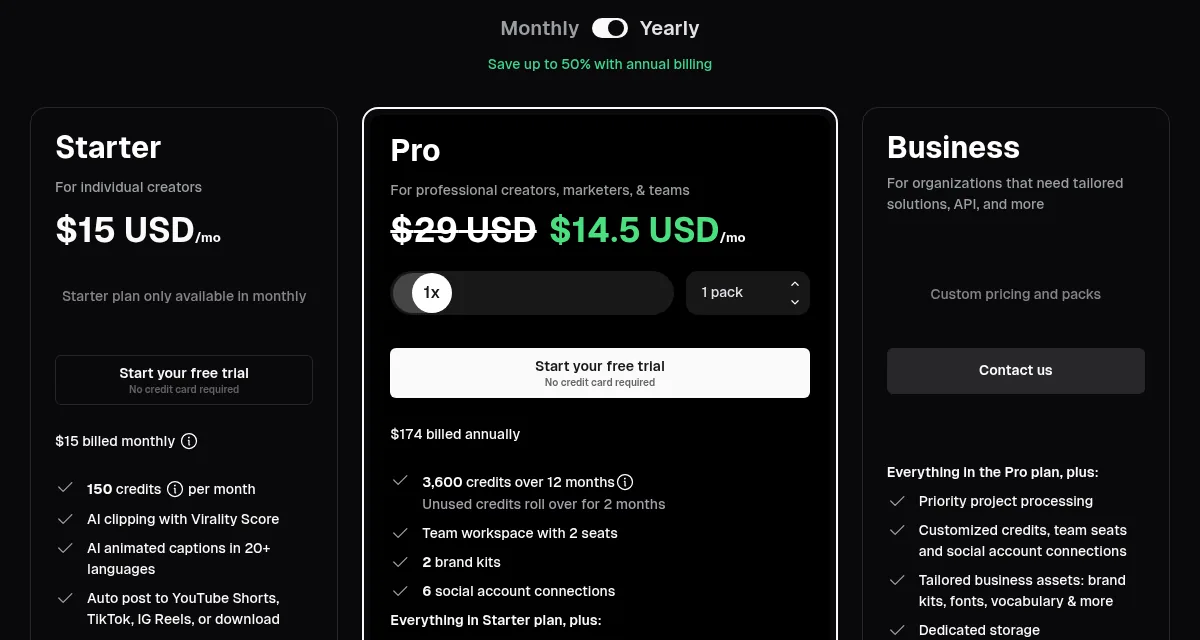
That creates an odd result: Pro billed yearly (US$14.50 a month) costs less than Starter (US$15 a month) and gives you twice the credits, plus the scheduler, 2 seats, 100GB of storage and square and landscape clips. The catch is that you pay US$174 up front for the year.
- Pay monthly for Starter if you're testing OpusClip, only need vertical clips, and might stop in a month or two.
- Pay yearly for Pro if you already know you'll use it most months. Over a year, Starter costs US$180 (12 × US$15) and yearly Pro costs US$174.
- Pay monthly for Pro only for a short busy spell, such as a launch. Twelve months of it costs US$348.
Marc Andrews, who wrote about OpusClip's prices on a UK account, made the same point: on the yearly toggle, Pro undercuts Starter with double the credits.
OpusClip plans in detail
- Free: US$0, with 60 credits a month, AI captions with emoji and keyword highlights and auto reframe. Clips carry a watermark, there's no editing, and after 3 days the clips can no longer be exported. Media expires after 3 days.
- Starter: US$15 a month, monthly only, with 150 credits a month, AI clipping with a virality score, animated captions in 20+ languages, auto posting to YouTube Shorts, TikTok and Instagram Reels, the editor, 1 brand kit, filler and silence removal and no watermark. Exports are available for 30 days and media expires after 29 days.
- Pro: US$29 a month, or US$14.50 a month billed yearly (US$174). 300 credits a month, a team workspace with 2 seats (OpusClip's table says 2 users a pack, up to 4), 2 brand kits, 6 social account connections, the social media scheduler, export to Adobe Premiere Pro and DaVinci Resolve, 9:16, 1:1 and 16:9 clips, 100GB of fixed storage, on demand credit top ups, speech enhancement, video dubbing and limited API access.
- Business: custom pricing, with customised credits, seats and social accounts, dedicated storage, API and custom integrations, a master service agreement and priority support with a dedicated Slack channel.
How OpusClip credits work
OpusClip's help page on credits, read 26 November 2026, says:
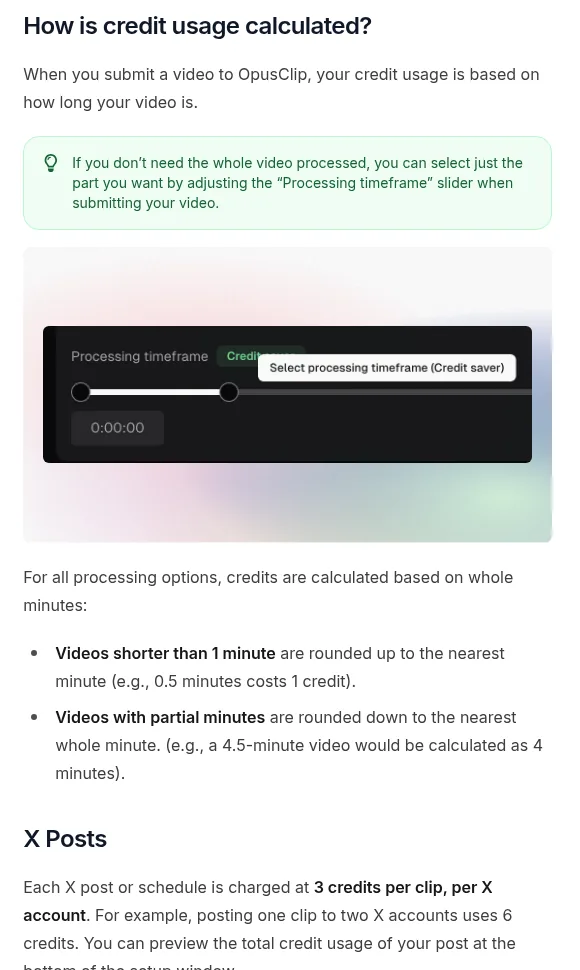
- One credit is one minute of the original video you upload, not of the clips you get back.
- Rounding: videos shorter than a minute are rounded up to one credit, and part minutes are rounded down (a 4.5 minute video costs 4 credits).
- Save credits: move the "processing timeframe" slider to process only the part of the video you want.
- Posting to X: each X post or scheduled post costs 3 credits per clip, per X account.
- Rollover: on a monthly plan, credits expire after 60 days, so unused credits roll over for one extra month. On a yearly plan you get the whole year's credits at once and they last 12 months. If you cancel, remaining credits still expire on their original date.
So a weekly hour long podcast is about 240 credits a month: too much for Starter's 150, comfortably inside Pro's 300.
| Plan | Credits a month | Source video that covers |
|---|---|---|
| Free | 60 | About two 30 minute videos |
| Starter | 150 | A 30 minute video every week, with a little to spare |
| Pro | 300 | A weekly hour long podcast or talk |
Marc Andrews tested this on his own free account: he reports that a source video of 15 minutes and 4 seconds cost exactly 15 credits, taken when the job started, and produced 21 clips. The price would have been the same for 3 clips.
Ways a small business might use it
- Cut a recorded talk, podcast or demo into short vertical clips for Reels, Shorts and TikTok.
- Add captions automatically, which helps people watching with the sound off.
- Find the strongest moments in a long video without scrubbing through it yourself.
Getting started
- Record one useful 10 to 20 minute video: a how to, a common question answered, or a job walkthrough.
- Upload it on the free plan and keep only the clips that make sense on their own.
- Check every caption for names, prices and place names before posting.
- Post a few clips a week for a month, then decide if a paid plan is worth it.
Before you pay
Processing uses 1 credit per minute of the original video (a 30 minute video uses 30 credits), so long uploads use credits quickly. Choose just the part of the video you need before you submit it.
OpusClip's public page bills in US dollars, so your bank may add a foreign transaction fee, and the pound price moves with the exchange rate. If you're VAT registered and the bill shows no UK VAT, you may need to account for it under the reverse charge: see section 5 of HMRC's place of supply guidance.
Which plan suits a small business?
Try the free plan with one real video first. Starter is the cheapest way to remove the watermark and post straight to your accounts if you pay month to month. If you'll keep it for the year, Pro billed yearly costs less than Starter and gives you twice the credits. Pro is also for people who film every week, need landscape or square clips, or want a scheduler so posts go out while they're on a job. If you need a presenter rather than clips of your own footage, see Synthesia or HeyGen; to edit your own video by its transcript, see Descript. Our guide to turning long videos into short clips covers the workflow.
Try OpusClip free (affiliate link)
This is an affiliate link: if you sign up through it, we may earn a commission at no extra cost to you. It doesn't change what we say. How we make money. Source: OpusClip pricing, read 26 November 2026. Prices are in US dollars.
What the free plan can't do, and what Starter and Pro add
The limits that matter most to a small business are the watermark, how long your clips stay available and whether you can post straight to your accounts. From OpusClip's pricing page, read 26 November 2026:
| Free (US$0) | Starter (US$15 a month) | Pro (US$29 a month) | |
|---|---|---|---|
| Watermark | Has watermark | Watermark free export | Watermark free export |
| How long to export | 3 days, up to 1080p | 30 days, highest resolution | No limit, highest resolution |
| Media storage | Expires after 3 days | Expires after 29 days | 100GB fixed storage |
| Clip shapes | Upright (9:16) only | Upright (9:16) only | Upright, square and landscape |
| Post to social media | No | Yes | Yes, plus a scheduler |
| Titles, descriptions and hashtags | No | Yes | Yes |
| Team seats | No | No | 2 users a pack, up to 4 |
Business is priced on request and adds customised seats and credits, dedicated storage and priority support. Most sole traders won't need it.
A simple weekly OpusClip routine for a local business
- Film one longer video. A five to ten minute walk round of a finished job, a talk through a common question, or a short tip. Talk to the camera and say what you did and why.
- Upload it and pick the part to clip. Choosing the timeframe saves credits, as each credit covers about a minute of the video you upload.
- Check the captions. Automatic captions can trip over trade terms, product names and place names, so read each clip before it goes out.
- Keep two or three clips a week. Pick the ones that make sense without the rest of the video, and add your town or area to the caption.
- Post or schedule them. Starter posts straight to your accounts; Pro can schedule a week ahead so posts go out while you're on a job.
Get permission before filming customers or their homes, and keep house numbers, car registrations and faces of passers by out of shot. For caption ideas and the rest of the workflow, see turning long videos into short clips; if you'd rather edit on your phone, compare CapCut's UK prices.
Paying for OpusClip from the UK
OpusClip's public pricing page showed us US dollars from the UK on 26 November 2026, so the amount on your card statement in pounds depends on the exchange rate, and some cards add a fee for paying in another currency.
Euros on the upgrade screen: Marc Andrews reports that when he opened the upgrade screen inside his own free UK account (updated 18 November 2026), every price was in euros, with no pound or dollar option: Starter at €15 a month and Pro at €29, or €14.50 a month billed yearly (€174). That is his finding from his own screenshots, not something we've tested. He also says he didn't open a checkout, so what a UK card is finally charged is unknown. Check the currency and the total on the checkout screen before you pay.
VAT: OpusClip's billing help page, read 26 November 2026, says it is "working on the feature to have the option to add VAT numbers. It should be here soon!" Whether VAT is added depends on how you buy; see do AI subscriptions charge UK VAT? A tool you use for the business is usually an allowable expense; keep the receipts.
Want to see what else does the same job? Our OpusClip alternatives page compares Vizard, Klap, Descript and four more with prices checked the same day.
Try OpusClip free (affiliate link)
Affiliate link: we may earn a commission if you sign up, at no extra cost to you. How we make money. Source: OpusClip pricing, read 26 November 2026.
Questions
Does the OpusClip free plan add a watermark?
Yes. OpusClip's pricing page says free plan clips have a watermark, and after 3 days they can no longer be exported. Starter, at US$15 a month, gives watermark free exports.
How long does OpusClip keep my videos?
On the free plan media expires after 3 days, and on Starter after 29 days. Pro has 100GB of fixed storage. Download the clips you want to keep.
Can OpusClip post my clips to social media?
Yes, from Starter upwards you can post straight to YouTube Shorts, TikTok and Instagram Reels, and Pro adds a scheduler and 6 social account connections. The free plan doesn't include posting, so you download the clips and upload them yourself.
Does OpusClip have a free plan?
Yes. A free forever plan with 60 credits a month; clips carry a watermark and can be exported for 3 days.
How much does OpusClip cost?
Free: US$0 (60 credits a month, with a watermark). Starter: US$15 a month, monthly only (150 credits a month). Pro: US$29 a month billed monthly, or US$14.50 a month billed yearly (US$174 a year, 300 credits a month). Shown in US dollars on OpusClip's page, checked 26 November 2026.
What are the alternatives to OpusClip?
Vizard is the closest match, Klap charges per clip rather than per minute, and Descript lets you edit by transcript and pick clips yourself. Submagic, VEED, Choppity and Riverside are also worth a look; our OpusClip alternatives page compares all seven.
How much does OpusClip actually cost?
The free plan is US$0 with 60 credits a month. Starter is US$15 a month with 150 credits and Pro US$29 a month with 300 credits, or US$14.50 a month billed yearly; Business is priced on request. One credit is one minute of uploaded video. Checked 26 November 2026.
Is there a free trial for OpusClip?
OpusClip has a free plan you can keep using, and its pricing page offers a free trial of Starter and Pro with no credit card required. Free plan clips carry a watermark and must be exported within 3 days.
Does OpusClip make AI videos?
Mainly it cuts your own long videos into short clips, with captions and reframing. Pro adds AI extras such as AI B-roll (image, video and stock), motion graphics and video dubbing.
Compare
Sources
- OpusClip pricing, read 26 November 2026
- OpusClip help: how credits work, read 26 November 2026
- OpusClip help: payments and billing, read 26 November 2026
- Marc Andrews: OpusClip pricing on a UK account, updated 18 November 2026, read 26 November 2026 (source of the euro and 15 credit claims, credited in the copy)
- HMRC: place of supply of services (VAT Notice 741A)
Free email
Practical AI tips for UK trades and small businesses: what a tool costs, who it suits and how to try it. Free, short, and you can unsubscribe any time. Sign up and you can download our free PDF of 50 ChatGPT prompts for small business straight away.
As well as the above, you'll get a short series of emails over about four weeks with free guides, tools and templates and, near the end, details of products I sell. Unsubscribe any time. See our privacy notice.
Unsubscribe any time. Privacy. Browse past issues.