
Alternatives
OpusClip alternatives (UK): what each clip tool costs for your videos
Quick answer: The closest OpusClip alternative is Vizard, which also cuts long videos into short clips and charges by the minute of video. Klap charges per clip made instead, which suits long videos. Descript suits anyone who wants to pick their own clips, and Descript, VEED, Choppity and Vizard all have free plans to test first.
Quick picks
- Closest like for like: Vizard. Same idea, a free plan with 60 credits a month, and a Black Friday price on yearly plans until 1 December.
- Pay per clip, not per minute: Klap. The length of your video doesn't use up the plan.
- Edit it yourself, like a document: Descript. Free plan with 60 media minutes a month.
- Captions that grab attention: Submagic.
- One editor for everything, priced in pounds: VEED.
- Most minutes for the money on a budget: Choppity.
- You record a podcast or interviews: Riverside, priced in pounds for UK visitors.
By James Gonzo, The AI Till. Every price on this page was read on each tool's own pricing page on 26 November 2026, opened from the UK. Most of these tools show US dollars to UK visitors, so we show US dollars and say so; we haven't converted anything. Riverside and VEED showed us pounds, so those are in pounds as shown. We have not made clips with these tools for this page: it is the published prices and plan rules worked through, not a hands on review. OpusClip and Descript pay us if you subscribe through our links; that doesn't change the sums or the order.
Why people look for an OpusClip alternative
OpusClip is good at what it does, but four things on its own pages push people to look around:
- Credits are charged on the video you upload, not the clips you keep. OpusClip's help page says one credit is one minute of the original video, with part minutes rounded down and videos under a minute counted as one. An hour long podcast costs 60 credits whether you post two clips or twenty. You can drag a "processing timeframe" slider to process only part of a video, which saves credits.
- The free plan is a test, not a business account. OpusClip Free gives 60 credits a month, but its pricing page says the clips carry a watermark, there's no editing, and after 3 days the clips can no longer be exported.
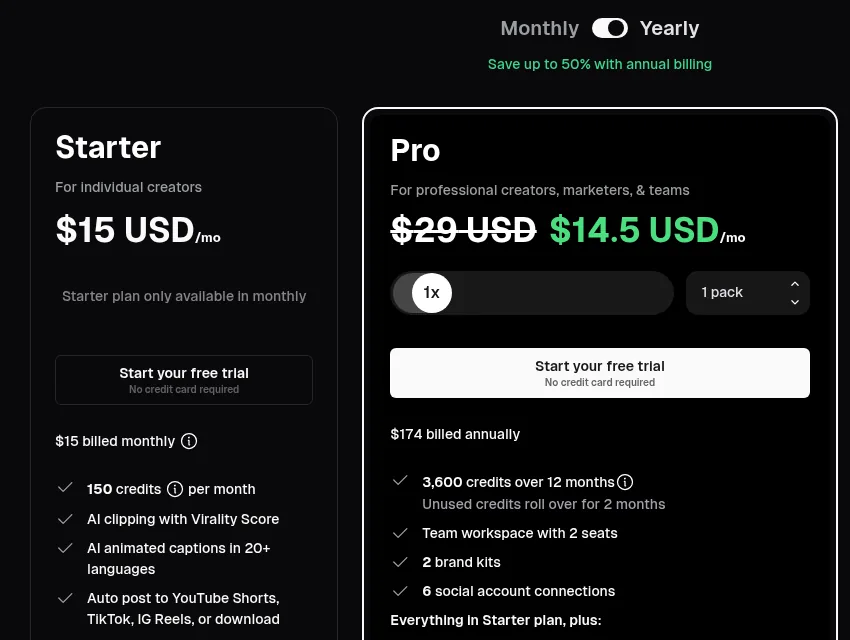
- Starter has no yearly price. Starter is US$15 a month and monthly only. The yearly saving starts at Pro, which is US$29 a month or US$174 for a year (US$14.50 a month).
- Posting to X costs extra credits. OpusClip's help page says each X post or scheduled post costs 3 credits per clip, per X account.
If any of those bite, one of the seven tools below will probably suit you better. If none of them do, OpusClip may still be the right tool: see If OpusClip still fits best.
OpusClip alternatives compared, checked 26 November 2026
| Tool | Best for | Free option | Paid from (as shown on its page) | What uses the plan up | Posts to social |
|---|---|---|---|---|---|
| OpusClip (for reference) | Automatic clips with a virality score | 60 credits a month, watermark, 3 day export | US$15 a month (Starter, monthly only) | Minutes of uploaded video | Yes, on all paid plans |
| Vizard | Closest like for like | 60 credits a month, 720p, 3 day storage | US$11.60 a month billed yearly (Black Friday price) | Credits, shared with its Agent tool | Yes, on paid plans |
| Klap | Long videos, few clips | Try 1 video free; downloading needs a paid plan | US$14.50 a month billed yearly, US$29 monthly | Clips made | Yes, unlimited accounts |
| Descript | Editing it yourself | 60 media minutes a month | US$16 a month billed yearly, US$24 monthly | Media hours and AI credits | Not shown on its pricing page |
| Submagic | Animated captions | Free to try (no free plan listed) | US$12 a month billed yearly (Black Friday price) | Credits and videos a month | From Pro |
| VEED | All round browser editor | Videos up to 10 minutes, 720p with watermark | £10 a month billed yearly | Credits, plus hours of subtitles and clips | Not shown on its pricing page |
| Choppity | Budget minutes | 45 minutes of video analysis | US$16.80 a month billed yearly, US$24 monthly | Hours of video analysed | Yes, from Starter |
| Riverside | Recording podcasts and interviews | 14 day free trial of paid plans | £24 a month with yearly billing | Recording and download hours | Publishing from Pro, scheduling from Grow |
Dollar prices are shown in US dollars on each provider's page; VEED and Riverside prices are shown in pounds on their pages. All checked 26 November 2026, before any VAT or card fees.
Vizard: the closest match to OpusClip
Best for: anyone who likes how OpusClip works but wants a better free plan or a cheaper year.
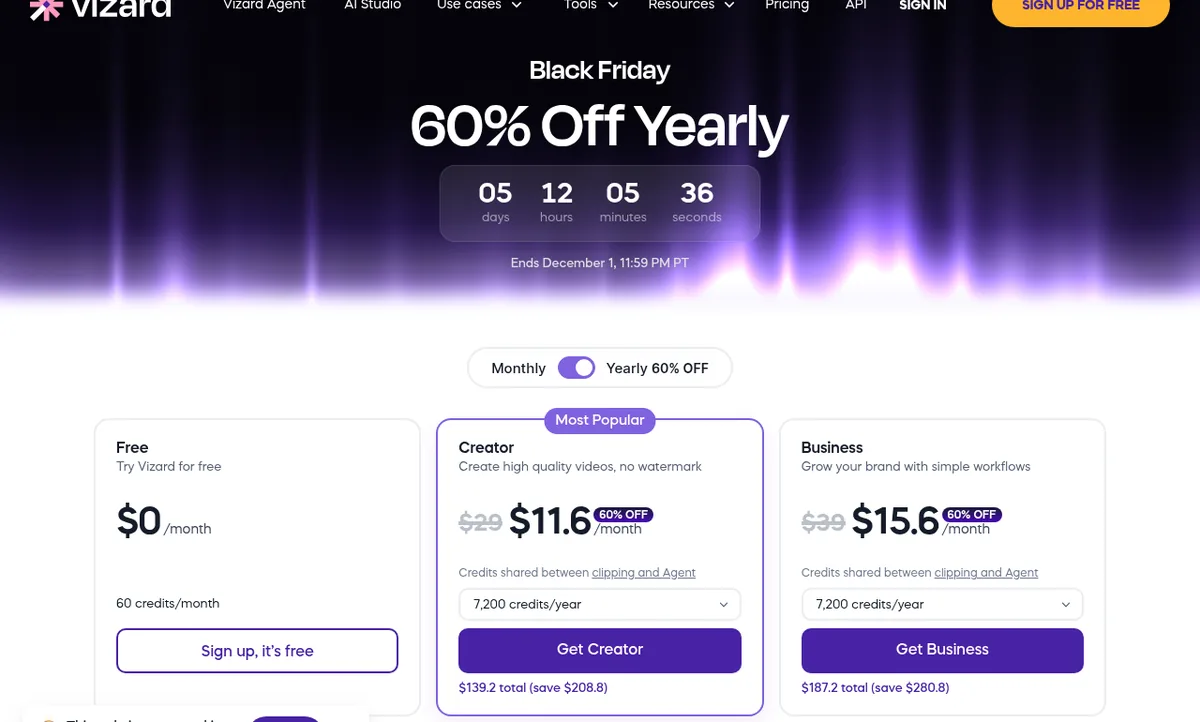
- Free option: 60 credits a month, uploads up to 60 minutes, export in 720p, 1 social account and 3 day storage.
- Price from: Creator showed US$11.60 a month billed yearly (US$139.20 for the year) under a Black Friday "60% off yearly" offer, next to a crossed out US$29. Business showed US$15.60 a month billed yearly (US$187.20), next to US$39. Vizard's banner says the offer ends at 11:59pm Pacific Time on 1 December, which is 7:59am UK time on 2 December.
- What uses the plan up: credits, shared between clipping and Vizard's Agent. Creator and Business start at 7,200 credits a year, and Vizard's comparison table shows 600 to 6,200 credits a month depending on the size you pick. Unused credits roll over for 2 months.
- Posting: schedule social posts on Creator (6 social accounts) and Business (20).
- Catches: the free plan's 720p export and 3 day storage; the paid monthly price wasn't visible on the yearly view we captured, so check the monthly toggle before you buy. Paid plans renew automatically.
Klap: pay for clips, not minutes
Best for: long videos where you only want a handful of clips, such as an hour long webinar or a recorded live.
- Free option: Klap's FAQ says you can try it free on 1 video with no card and preview and edit the clips; downloading and posting them needs a paid plan.
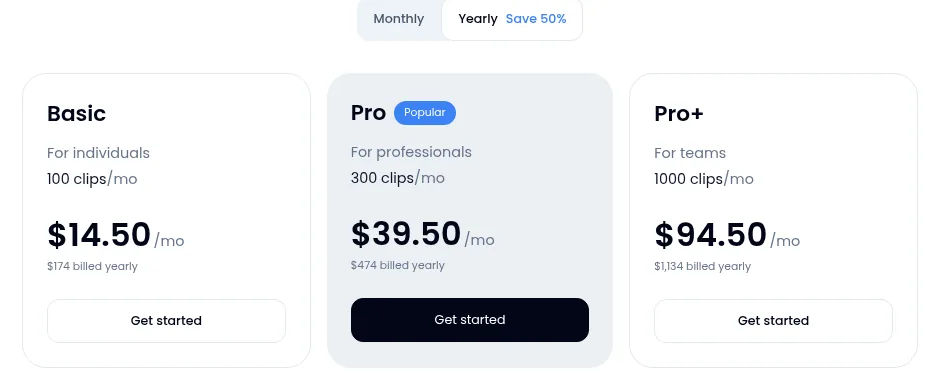
- Price from: Basic is US$29 a month, or US$174 a year (US$14.50 a month). Pro is US$79 a month, or US$474 a year (US$39.50 a month). Pro+ is US$189 a month, or US$1,134 a year (US$94.50 a month). Klap says its prices were last updated on 4 November 2026.
- What uses the plan up: clips. Basic gives 100 clips a month, Pro 300 and Pro+ 1,000. Klap's FAQ says the length of your source video doesn't use up your plan, and videos can run up to 3 hours. Yearly plans get the whole year's clips at once.
- Posting: scheduling and publishing to TikTok, YouTube, Instagram, LinkedIn and Facebook, with unlimited social accounts on every plan.
- Catches: monthly billing costs twice the yearly rate. Klap's refund terms give a full refund in your first month on either billing.
Descript: choose the clips yourself
Best for: podcasters and anyone who wants to edit the whole video by editing its transcript, then pull clips out with its Create Clips tool.
- Free option: 60 media minutes a month.
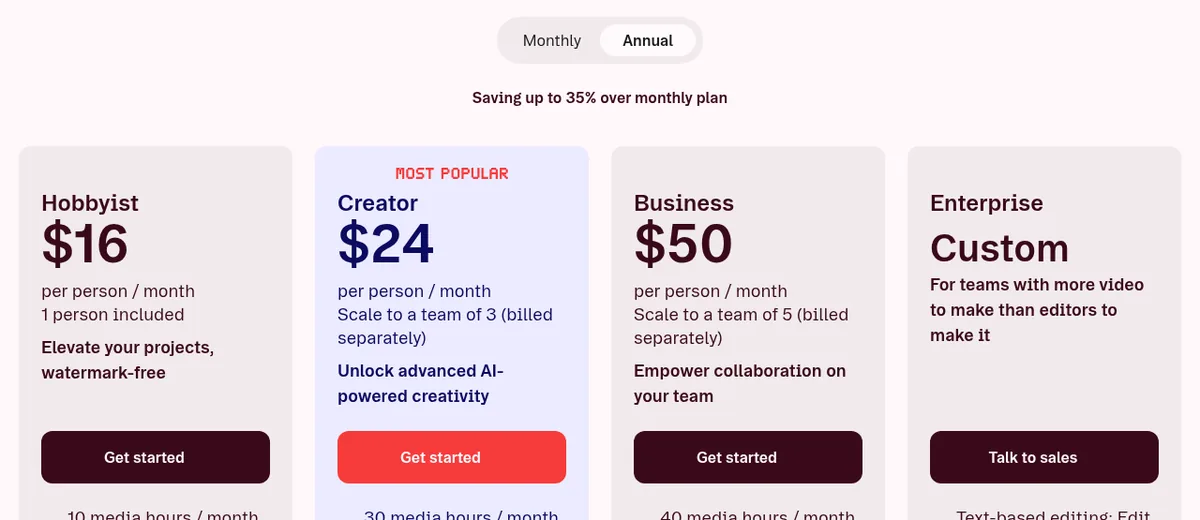
- Price from: Hobbyist is US$16 a person a month billed yearly or US$24 monthly, with 10 media hours, 400 AI credits and 1080p export without a watermark. Creator is US$24 billed yearly or US$35 monthly, with 30 media hours, 800 AI credits and 4K export. Descript says yearly saves up to 35%.
- What uses the plan up: media hours (the video you bring in) and AI credits for its AI tools.
- Posting: not listed on its pricing page; plan to download and post yourself.
- Catches: it is an editor first, so you choose the moments rather than letting AI pick them all. That is slower, but the clips are the ones you want.
Try Descript's free plan (affiliate link)
Submagic: captions first
Best for: short videos where bold, animated captions do the selling, plus some long video clipping.
- Free option: you can try it free; the pricing page doesn't list a free plan or its limits.
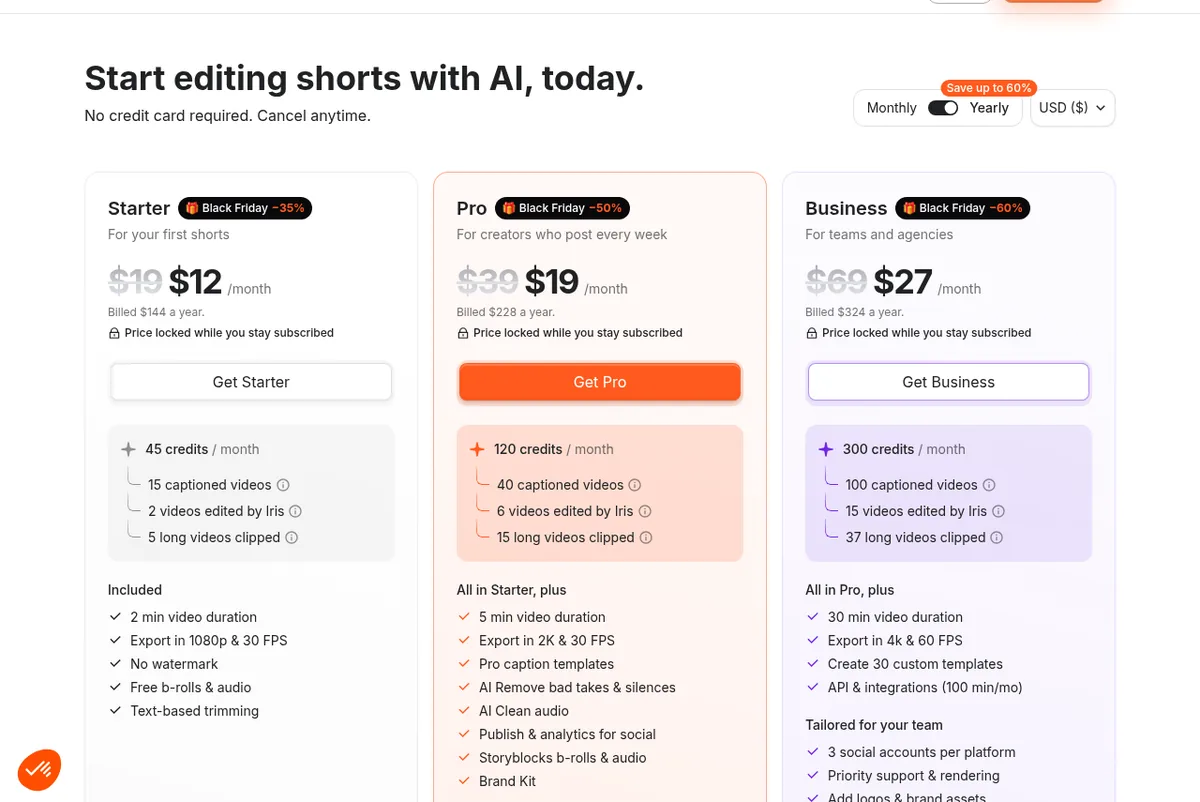
- Price from: on 26 November the yearly prices carried Black Friday labels. Starter showed US$12 a month (billed US$144 a year, next to a crossed out US$19, "Black Friday 35% off"). Pro showed US$19 a month (billed US$228 a year, next to US$39, 50% off). Business showed US$27 a month (billed US$324 a year, next to US$69, 60% off). Submagic says the price is locked while you stay subscribed. We didn't see an end date for the offer.
- What uses the plan up: credits and video counts. Starter gives 45 credits a month, 15 captioned videos and 5 long videos clipped; Pro gives 120 credits, 40 captioned videos and 15 long videos clipped.
- Posting: "Publish and analytics for social" starts at Pro.
- Catches: Starter's limit is 2 minutes per video and Pro's is 5 minutes, so it suits shorts more than long recordings.
VEED: one editor, priced in pounds
Best for: small teams who want subtitles, clips from long videos and general editing in one browser tool.
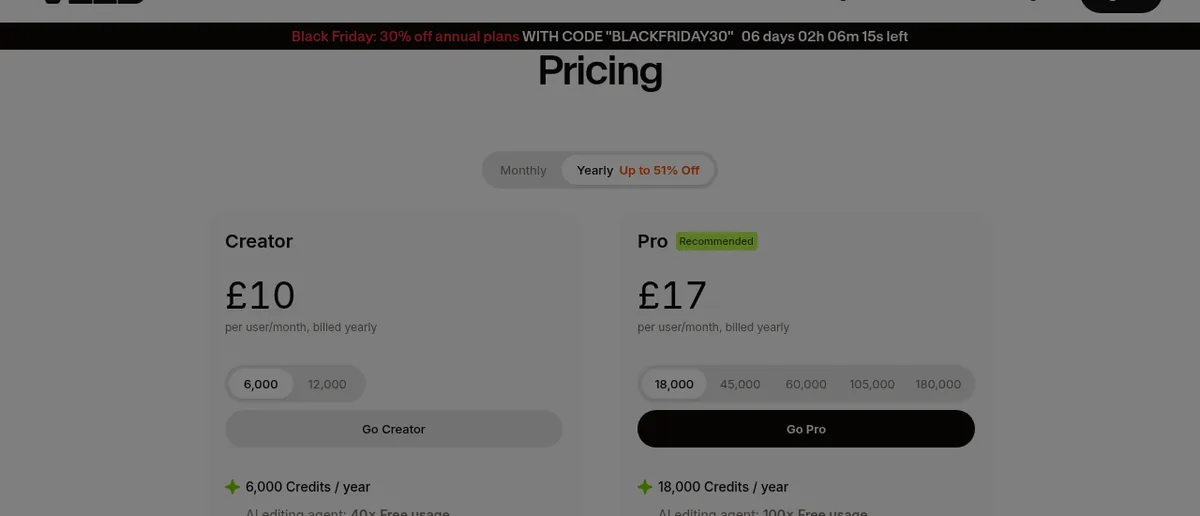
- Free option: VEED's free plan lets you edit and subtitle videos up to 10 minutes, then export at 720p with a watermark.
- Price from: Creator is £10 a person a month billed yearly, with 10 hours of subtitles and 20 hours of clips from long videos a month and 1080p exports without the VEED logo. Pro is £17 a person a month billed yearly, with unlimited subtitles and clips from long videos and 4K exports. VEED showed us these in pounds.
- Black Friday: VEED's page showed "30% off annual plans with code BLACKFRIDAY30", with about six days left on its countdown when we checked.
- What uses the plan up: credits for AI features (6,000 a year on Creator, 18,000 on Pro), plus the hours above.
- Catches: we read the yearly prices; check the monthly toggle if you don't want to commit for a year.
Choppity: the most hours on a budget
Best for: podcasters and course makers who upload a lot of hours and want the cost per hour low.
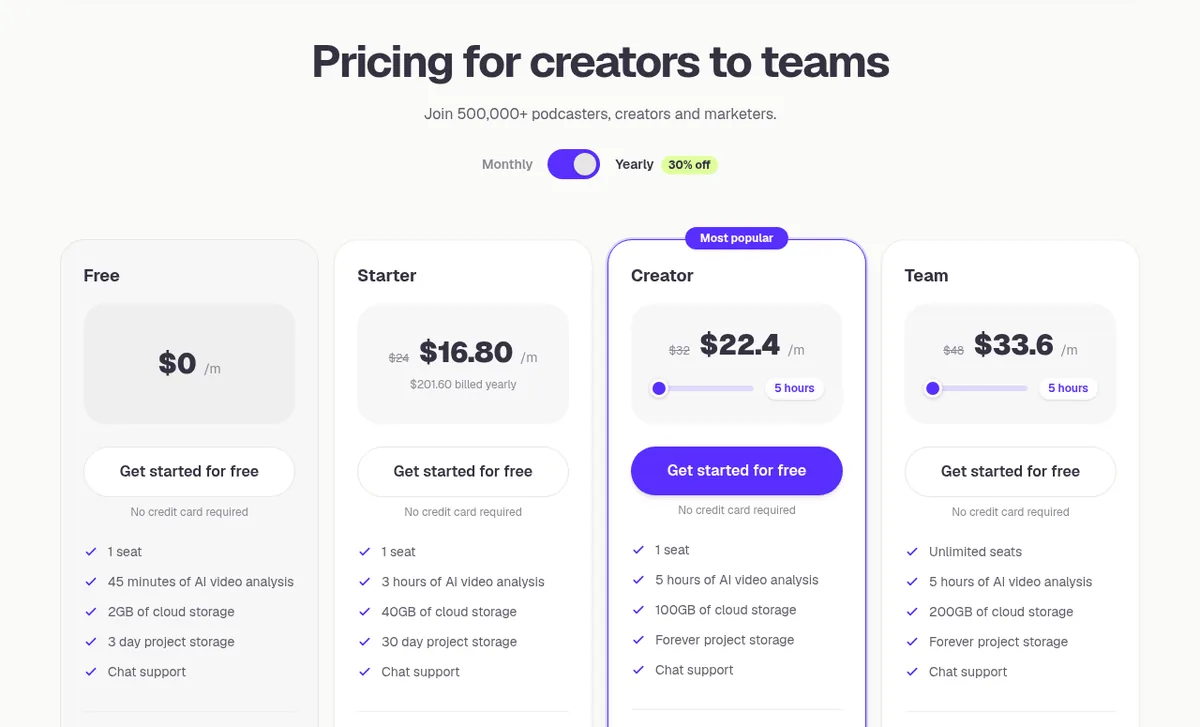
- Free option: 45 minutes of AI video analysis, 2GB of storage and 3 day project storage.
- Price from: Starter is US$24 a month, or US$16.80 a month billed yearly (US$201.60), with 3 hours of AI video analysis. Creator is US$32 a month, or US$22.40 billed yearly, with 5 hours. Team is US$48, or US$33.60 billed yearly, with unlimited seats.
- What uses the plan up: hours of video analysed.
- Posting: schedule social posts from Starter (1 social account); Creator manages 3 and Team 6.
- Catches: the free plan's 3 day project storage. It is a smaller company than OpusClip, so check the export quality on your own footage first.
Riverside: record it and clip it in one place
Best for: people who record a podcast or interviews and want clips from the same tool, rather than uploading files somewhere else.
- Free option: a 14 day free trial on its paid plans.
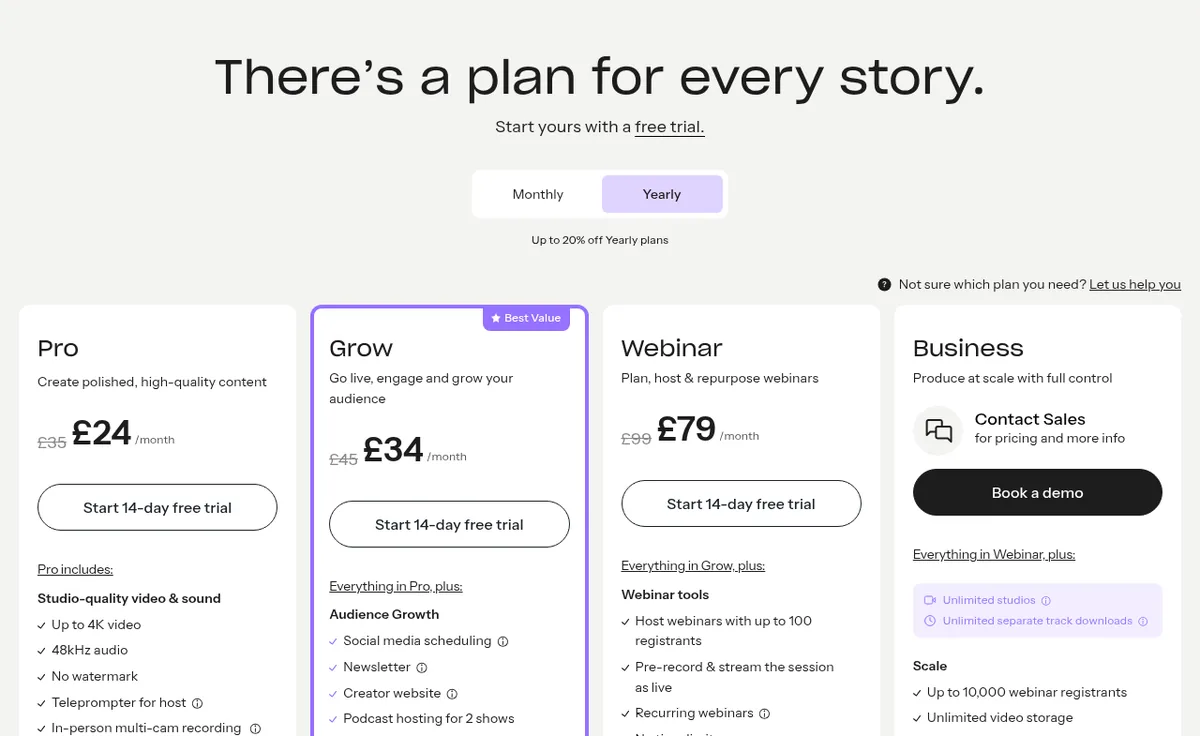
- Price from: Riverside showed us pounds. With yearly billing selected, Pro showed £24 a month next to a crossed out £35, Grow £34 next to £45, and Webinar £79 next to £99. Riverside says yearly billing saves up to 20%.
- What uses the plan up: recording and separate track download hours (15 hours a month on Pro, 20 on Grow) and AI credits for some features. Riverside's FAQ says Pro users start with 400 free AI credits.
- Posting: Pro includes Magic Clips and publishing to YouTube, Spotify, Apple, Instagram, LinkedIn and more; social media scheduling starts at Grow.
- Catches: you pay for a recording studio as well as clips. Worth it if you record there anyway; not if you already have finished videos.
Is there a free OpusClip alternative?
Yes, several, but each free plan has a catch, so treat them as a way to test rather than a long term answer:
- Vizard Free: 60 credits a month, uploads up to 60 minutes, 720p export, 3 day storage. The closest free match for OpusClip.
- Descript Free: 60 media minutes a month, for editing it yourself.
- VEED Free: videos up to 10 minutes, exported at 720p with a watermark.
- Choppity Free: 45 minutes of AI video analysis with 3 day project storage.
- Klap: one free video to preview and edit, but you need a paid plan to download.
- OpusClip Free: 60 credits a month, with a watermark, no editing and a 3 day export window.
If you want to see how an OpusClip style tool handles your own footage, Vizard Free is the one to try first; check whether its free exports carry a watermark before you post them on a business account.
Clip tool cost calculator
Put in a normal month of your long videos. It counts minutes the way each tool does (OpusClip rounds each video down to whole minutes, and a video under a minute counts as one), shows which plans cover you and what each clip works out at.
Prices from each pricing page on 26 November 2026, in US dollars as shown, before any VAT. Free plans carry the catches shown.
Three businesses worked out
Made up businesses, real prices from the pricing pages on 26 November 2026, in US dollars as shown, before any VAT. "A clip" is the monthly price divided by the clips wanted. The yearly figures are the monthly rate when you pay for the year up front.
| Business | The sum | Free plans that cover it | Cheapest paying monthly | Cheapest paying yearly |
|---|---|---|---|---|
| Plumber: four job walkthroughs a month, each 10 and a half minutes, wanting 3 clips from each | 4 x 10.5 minutes = 42 minutes; OpusClip counts 4 x 10 = 40 credits; 12 clips | OpusClip Free, Vizard Free, Descript Free, Choppity Free (see the catches above) | OpusClip Starter: US$15 a month (US$1.25 a clip) | Vizard Creator: US$11.60 a month at its Black Friday price (about US$0.97 a clip) |
| Salon owner: four 30 minute live tutorials a month, wanting 5 clips from each | 4 x 30 minutes = 120 minutes; OpusClip counts 120 credits; 20 clips | None: over 60 minutes | OpusClip Starter: US$15 a month (US$0.75 a clip) | Vizard Creator: US$11.60 a month at its Black Friday price (US$0.58 a clip) |
| Business coach: a one hour podcast every week (4 a month), wanting 8 clips from each | 4 x 60 minutes = 240 minutes; OpusClip counts 240 credits; 32 clips | None: over 60 minutes | Descript Hobbyist: US$24 a month if you pick the clips yourself; OpusClip Pro or Klap Basic: US$29 a month (about US$0.91 a clip) for automatic clips | Vizard Creator: US$11.60 a month at its Black Friday price (about US$0.36 a clip) |
What the rows show: for a few short videos a month, the free plans really do cover it. Once you upload an hour or more a week, the minutes matter more than the clips: OpusClip Starter's 150 credits run out at two and a half hours, while Klap only counts the clips you keep. If you're happy to pay for a year, OpusClip Pro and Klap Basic both cost US$14.50 a month, but OpusClip gives you 300 minutes a month and Klap gives you 100 clips, so choose by whether you upload long videos or want lots of clips. Vizard's Black Friday price is the cheapest year of all three until 1 December. After that, check its normal yearly price before you compare.
How to test two of them on one video
- Pick one real video under 60 minutes, such as a job walkthrough or a recorded live. OpusClip Free and Vizard Free both accept it.
- Run it through both the same day. Note how many clips each suggests and how many you would actually post. That second number is what Klap would charge you for.
- Export the ones you like straight away. OpusClip's free clips stop being exportable after 3 days and Vizard's free storage is 3 days.
- Check the captions for your trade words and place names. Correcting captions is where the time goes, so count the minutes it takes.
- Put your month into the table above and pay for the tool whose clips you would post, not the cheapest line.
Our guide to turning long videos into short clips covers what to film and how to word the posts, and AI social media posts for tradesmen has captions to start from. If you want videos made from a script rather than from footage, that is a different kind of tool: what an AI video generator costs works out Synthesia, HeyGen and Runway per finished minute. Looking for other offers this week? See our Black Friday 2026 AI tool deals. OpusClip and Descript showed no Black Friday offer on their pricing pages when we checked on 26 November.
If OpusClip still fits best
OpusClip is still a strong choice if you post lots of short clips from shorter videos, want its virality score and want a scheduler for 6 social accounts on Pro. Full plan details are on our OpusClip pricing page. Our link includes the code 40OFF (affiliate link), which OpusClip's affiliate manager told us on 2 November 2026 gives 40% off the first month of Pro billed monthly; check the discount shows before you pay. For Descript, use Descript's free plan (affiliate link) to try transcript editing first. We earn a commission if you subscribe through either link, at no extra cost to you. How we make money.
Questions people ask
Is there a free alternative to OpusClip?
Yes. Vizard's free plan gives 60 credits a month with 720p export and 3 day storage, and Descript's free plan includes 60 media minutes a month. VEED and Choppity also have free plans. OpusClip's own free plan is 60 credits a month with a watermark.
How does OpusClip count credits?
One credit for each minute of the original video you upload. Partial minutes are rounded down, a video under a minute costs one credit, and posting to X costs 3 credits per clip, per X account.
Is Klap cheaper than OpusClip?
It depends on your videos. Klap charges for clips made, so long videos with few clips favour Klap Basic at US$14.50 a month billed yearly for 100 clips. OpusClip Pro costs the same billed yearly but gives 300 minutes of video, so short videos with many clips favour OpusClip. Both are shown in US dollars on their pages.
Do these clip tools add UK VAT?
The pricing pages we read on 26 November 2026 don't say. OpusClip's billing help page says an option to add a VAT number "should be here soon". Check the total at checkout before you pay.
What is the closest alternative to OpusClip?
Vizard. It also turns long videos into short clips automatically, charges in credits, has a scheduler on its paid plans and a free plan with 60 credits a month. Klap is the closest if you would rather pay per clip than per minute.
Which OpusClip alternative is best for podcasts?
If you record the podcast yourself, Riverside records and clips in one place. If you already have the files, Descript lets you edit the whole episode by its transcript and pull clips out, and Choppity gives 3 hours of video analysis a month on Starter.
Can these tools post clips straight to social media?
Vizard, Klap, Choppity and OpusClip can schedule posts on their paid plans, Submagic from Pro and Riverside from Grow. Descript's and VEED's pricing pages don't list a scheduler, so plan to download and post yourself.
Sources
- OpusClip pricing, read 26 November 2026
- OpusClip help: how credits work, read 26 November 2026
- OpusClip help: payments and billing, read 26 November 2026
- Vizard pricing, read 26 November 2026
- Klap pricing, read 26 November 2026
- Descript pricing, read 26 November 2026
- Submagic pricing, read 26 November 2026
- VEED pricing, read 26 November 2026
- Choppity pricing, read 26 November 2026
- Riverside pricing, read 26 November 2026
- GPT-Video pricing, read 26 November 2026 (calculator only)
Free email
Practical AI tools for UK trades and small businesses: what each one costs, who it suits and a tip to try. Short, and free.
As well as the above, you'll get a short series of emails over about four weeks with free guides, tools and templates and, near the end, details of products I sell. Unsubscribe any time. See our privacy notice.
Unsubscribe any time. Privacy. Browse past issues.